Thanks to guys at internettablettalk, I noticed that youtube had changed the way video files are referred on the page source code. Thus, uktube stopped working until this problem had been fixed. I was just able to fix and test it a few minutes ago and I wanted to let you all know that the problem has been fixed and there is a new version for you to download.
So, once again, thanks for letting me know of the uktube bug. UKMP 1.62 only fixes uktube bug in downloading youtube videos. So, don't expect any fixes related to ogg files.
It seems that ogg installation at the moment is missing ogg demux for some users. I'll try to get oggs working again in ukmp for the 1.63 release some time next week
EDIT: LINK FIXED
Download here:
http://maemo.org/downloads/product/ukmp/
Showing posts with label 770. Show all posts
Showing posts with label 770. Show all posts
Sunday, August 26, 2007
Thursday, August 16, 2007
UKMP 1.6 is out
I've finally come back from the summer vacation and I've had the time to look into UKMP again for a while.
Well, many new thing have happened since the last version.
1. Exit button
2. Maemoscrobbler integration (scrobbles to last fm)
3. Automatic thumbnail images from video files
4. Currently playing -screen
5. Progress bar
6. Touch to seek functionality in the progress bar
7. Full M4A support, including cover image from the m4a files
8. Larger video thumbnails
Here are two screenshots to illustrate a bit:


All right, a bit deeper explanation on each one.
1. Exit button.
Just click to exit. You can also press back-button and keep it pressed for about two secs to exit.
2. Maemoscrobbler integration
Maemoscrobbler is an excellet program made by disq. Install maemo scrobbler, insert your login details to last fm in the control panel application and from that on, whenever you have net connection, ukmp will scrobble your music to your last-fm account.
3. Automatic thumbnail images from video files
UKMP uses mplayer to retrieve the thumb images from the video files that you have on your device. It will take the first frame and use that. If you have an idea on how to get an image from seeking 30 secs into the video, let me know.
On the down side, this feature needs the latest version of mplayer, so please update your mplayer. It's great to do that anyway, as the latest mplayer version is at least 30 % faster than previous one. Well, that's my subjective impression anyway.
4. Currently playing screen
This is the first iteration of the screen. The most important thing about is the progress bar. I will also add a bookmark feature to this screen in the future.
REMEMBER that you can use back-button to switch between the views at all times.
5. Progress bar
A pretty cool looking progress bar that shows the time played, song length and your position on the bar.
6. Touch to seek functionality in the progress bar
You can just click on any place in the bar to seek to that location. Pretty basic stuff, but worth mentioning IMHO. So many people listen to long songs / audio books.
7. Full m4a support
If you have converted most of your music to m4a format, then you'll really like this one. Pasi Keränen has done a wonderful job of integrating m4a support to ukmp. It is even able to read the images from the audio files. However, if you happen to have such files, bear in mind that saving and converting them will take quite long time, so your first startup might be a long one. Thumbnails will be saved as smaller images so it won't take THAT long in the future.
However, this also means that you have to have Pythin imaging library installed. Which sadly only comes in the latest python version. So, that's a requirement now as well.
8. Larger video thumbnails
I noticed that the thumbnails were a bit too small still, so I modified the thumbnails to be a bit larger (from 125 pixels wide to 143 pixels wide)
Summa summarum:
A great update, but you'll have to update to latest python version. If you have python 2.4, you need to unistall it first. To do that, you have to uninstall all python applications and then uninstall python 2.4. Sucks. Yeah. I know. I hope you all have python 2.5. If you have python 2.5. Just go to application manager to update.
The light theme is not quite ready yet, so I didn't include the desktop file to it. You can test it out from xterm with command:
ukmp altskin
You can download the latest version of UKMP and UKTUBE from here:
http://maemo.org/downloads/product/ukmp
and remember that you need to have python and mplayer installed. If you don't have them, install them first from here:
Python
mplayer
I will be in Iceland from Friday to Wednesday, so I won't be able to respond to questions during that time.
EDIT:
If you need ogg support, you can install ogg to your device from here:
http://ogg.garage.maemo.org/ogg-support.install
I've also updated the ukmp to 1.61 after fixing some bugs.
Seems like it's semi stable now. So, have a great weekend!
Well, many new thing have happened since the last version.
1. Exit button
2. Maemoscrobbler integration (scrobbles to last fm)
3. Automatic thumbnail images from video files
4. Currently playing -screen
5. Progress bar
6. Touch to seek functionality in the progress bar
7. Full M4A support, including cover image from the m4a files
8. Larger video thumbnails
Here are two screenshots to illustrate a bit:


All right, a bit deeper explanation on each one.
1. Exit button.
Just click to exit. You can also press back-button and keep it pressed for about two secs to exit.
2. Maemoscrobbler integration
Maemoscrobbler is an excellet program made by disq. Install maemo scrobbler, insert your login details to last fm in the control panel application and from that on, whenever you have net connection, ukmp will scrobble your music to your last-fm account.
3. Automatic thumbnail images from video files
UKMP uses mplayer to retrieve the thumb images from the video files that you have on your device. It will take the first frame and use that. If you have an idea on how to get an image from seeking 30 secs into the video, let me know.
On the down side, this feature needs the latest version of mplayer, so please update your mplayer. It's great to do that anyway, as the latest mplayer version is at least 30 % faster than previous one. Well, that's my subjective impression anyway.
4. Currently playing screen
This is the first iteration of the screen. The most important thing about is the progress bar. I will also add a bookmark feature to this screen in the future.
REMEMBER that you can use back-button to switch between the views at all times.
5. Progress bar
A pretty cool looking progress bar that shows the time played, song length and your position on the bar.
6. Touch to seek functionality in the progress bar
You can just click on any place in the bar to seek to that location. Pretty basic stuff, but worth mentioning IMHO. So many people listen to long songs / audio books.
7. Full m4a support
If you have converted most of your music to m4a format, then you'll really like this one. Pasi Keränen has done a wonderful job of integrating m4a support to ukmp. It is even able to read the images from the audio files. However, if you happen to have such files, bear in mind that saving and converting them will take quite long time, so your first startup might be a long one. Thumbnails will be saved as smaller images so it won't take THAT long in the future.
However, this also means that you have to have Pythin imaging library installed. Which sadly only comes in the latest python version. So, that's a requirement now as well.
8. Larger video thumbnails
I noticed that the thumbnails were a bit too small still, so I modified the thumbnails to be a bit larger (from 125 pixels wide to 143 pixels wide)
Summa summarum:
A great update, but you'll have to update to latest python version. If you have python 2.4, you need to unistall it first. To do that, you have to uninstall all python applications and then uninstall python 2.4. Sucks. Yeah. I know. I hope you all have python 2.5. If you have python 2.5. Just go to application manager to update.
The light theme is not quite ready yet, so I didn't include the desktop file to it. You can test it out from xterm with command:
ukmp altskin
You can download the latest version of UKMP and UKTUBE from here:
http://maemo.org/downloads/product/ukmp
and remember that you need to have python and mplayer installed. If you don't have them, install them first from here:
Python
mplayer
I will be in Iceland from Friday to Wednesday, so I won't be able to respond to questions during that time.
EDIT:
If you need ogg support, you can install ogg to your device from here:
http://ogg.garage.maemo.org/ogg-support.install
I've also updated the ukmp to 1.61 after fixing some bugs.
Seems like it's semi stable now. So, have a great weekend!
Friday, August 03, 2007
UKMP 1.51 combined with updated UKTUBE
UKMP 1.50 release was a bit hasty one and I missed a few real annoyances. Well, 1.51 version is a bug fix version and should fix the most critical bugs.
1. Clicking in the album works ACTUALLY selects the album you clicked on and not the one above or below it. (Yeah, how did I miss that? I have no idea)
2. If you have less that 16 albums, song list allows you to scroll (It actually didn't allow you to scroll in 1.50)
3. 1.51 consumes almost 0 processor time when idling. Previous version only went to energy saving when it was doing something and went to full 100% power use when it was idle. Just a small mistake of using == instead of != in one place... An example of why not code after midnight.
4. Because of the number three, smooth scrolling is smoother, as it's not in processor saving mode when it's scrolling ;)
5. Press and hold back button to close the app works.
All right. So, it's in a usable state now. I've been using 1.51 for a few days now for listening hours and hours of music and it seems stable and a joy to use. Next version will have exit button and optimized startup time.
UKTUBE has also been updated to support logging into youtube account as well as it tells you if a download fails instead of crashing. Most of the time if a download fails, it's because there is a age check in youtube. Just insert your login credentials to uktube to le uktube to login and tell youtube that your are not underaged.
Next uktube version will store the credentials and I will probably clean up the interface a bit.
You can download the latest version of UKMP and UKTUBE from here:
http://maemo.org/downloads/product/ukmp
and remember that you need to have python and mplayer installed. If you don't have them, install them first from here:
Python
mplayer
1. Clicking in the album works ACTUALLY selects the album you clicked on and not the one above or below it. (Yeah, how did I miss that? I have no idea)
2. If you have less that 16 albums, song list allows you to scroll (It actually didn't allow you to scroll in 1.50)
3. 1.51 consumes almost 0 processor time when idling. Previous version only went to energy saving when it was doing something and went to full 100% power use when it was idle. Just a small mistake of using == instead of != in one place... An example of why not code after midnight.
4. Because of the number three, smooth scrolling is smoother, as it's not in processor saving mode when it's scrolling ;)
5. Press and hold back button to close the app works.
All right. So, it's in a usable state now. I've been using 1.51 for a few days now for listening hours and hours of music and it seems stable and a joy to use. Next version will have exit button and optimized startup time.
UKTUBE has also been updated to support logging into youtube account as well as it tells you if a download fails instead of crashing. Most of the time if a download fails, it's because there is a age check in youtube. Just insert your login credentials to uktube to le uktube to login and tell youtube that your are not underaged.
Next uktube version will store the credentials and I will probably clean up the interface a bit.
You can download the latest version of UKMP and UKTUBE from here:
http://maemo.org/downloads/product/ukmp
and remember that you need to have python and mplayer installed. If you don't have them, install them first from here:
Python
mplayer
Tuesday, July 24, 2007
UKMP 1.5 is out and it's looking sweet
Big thanks to Roope Rainisto from Nokia for helping out tune up the interface. The song list now sports thumb interface for selecting songs. Looks better too, have a look at it yourselves:

Another big thing that's been asked for is kinetic scrolling. After trying it out for a while, I am very impressed by it. Yeah, I know, here is another developer again boasting his ego, but I am not applauding myself for that. Kinetic scrolling is really sall thing to add technically once you have smooth scrolling anyway. But the thing I've been thinking about now is that Nokia should implement that same thing to the web browser. It would be so much better to use that to scroll around the page. Let's say you've read the article through. Wan't to go up to the beginning of the page? No probs, just flick the finger quickly and it will scroll to the top in a split sec. Want to scroll in a controllable fashion, scroll with your finger and stop it before raising it from the device surface.
One more thing I have forgotten to write about is that this version also supports wma files and might also support aac files as well as some bug fixes related to continuous playback.
You can download the latest version of UKMP and UKTUBE from here:
http://maemo.org/downloads/product/ukmp
and remember that you need to have python and mplayer installed. If you don't have them, install them first from here:
Python
mplayer
As always, you can check out the new features from the video below:

Another big thing that's been asked for is kinetic scrolling. After trying it out for a while, I am very impressed by it. Yeah, I know, here is another developer again boasting his ego, but I am not applauding myself for that. Kinetic scrolling is really sall thing to add technically once you have smooth scrolling anyway. But the thing I've been thinking about now is that Nokia should implement that same thing to the web browser. It would be so much better to use that to scroll around the page. Let's say you've read the article through. Wan't to go up to the beginning of the page? No probs, just flick the finger quickly and it will scroll to the top in a split sec. Want to scroll in a controllable fashion, scroll with your finger and stop it before raising it from the device surface.
One more thing I have forgotten to write about is that this version also supports wma files and might also support aac files as well as some bug fixes related to continuous playback.
You can download the latest version of UKMP and UKTUBE from here:
http://maemo.org/downloads/product/ukmp
and remember that you need to have python and mplayer installed. If you don't have them, install them first from here:
Python
mplayer
As always, you can check out the new features from the video below:
Thursday, July 05, 2007
UKTUBE 0.6 out, UKMP 1.4 out (in beta)
UKTUBE 0.6
Uktube 0.6 adds support for streaming of videos. You no longer have to wait for the video to finish downloading, as UKTUBE will just buffer the first one megabyte and then start playing.
I also added delete, which deletes the file, takes it out of the dropdown and selects the next video.
UKMP 1.4
UKMP 1.4 has major feature of supporting video. Now, basically that means that it also needs mplayer. As UKMP and UKTUBE are bundled together you would need mplayer for uktube anyway, so I don't see that as too much of a problem. What makes this really beta quality is that ukmp cannot make thumbnails of the videos by itself. It relies on UKTUBE to make thumbnails for the videos it downloads. If Serge (ssvb) can compile mplayer with support for -vo jpeg, I can add the thumbnails automatically on start.
Have a look at the video to see how watching videos works on UKMP at the moment.
About the release:
I managed to squeeze out the major bugs from UKMP 1.4 and UKTUBE 0.6. I'm about to leave for a week long vacation, so I felt that even though I would have wanted to give both of the apps some more polish, I just didn't have the time to do it. In any case, I'm relatively happy on how the new features turned out.
1.5 of UKMP will focus on improving the UI to look better. Thanks Roope Rainisto for a very good suggestion on the songlist part. I will implement that to the 1.5 version.
You can download the latest version of UKMP and UKTUBE from here:
http://maemo.org/downloads/product/ukmp
and remember that you need to have python and mplayer installed. If you don't have them, install them first from here:
Python
mplayer
Uktube 0.6 adds support for streaming of videos. You no longer have to wait for the video to finish downloading, as UKTUBE will just buffer the first one megabyte and then start playing.
I also added delete, which deletes the file, takes it out of the dropdown and selects the next video.
UKMP 1.4
UKMP 1.4 has major feature of supporting video. Now, basically that means that it also needs mplayer. As UKMP and UKTUBE are bundled together you would need mplayer for uktube anyway, so I don't see that as too much of a problem. What makes this really beta quality is that ukmp cannot make thumbnails of the videos by itself. It relies on UKTUBE to make thumbnails for the videos it downloads. If Serge (ssvb) can compile mplayer with support for -vo jpeg, I can add the thumbnails automatically on start.
Have a look at the video to see how watching videos works on UKMP at the moment.
About the release:
I managed to squeeze out the major bugs from UKMP 1.4 and UKTUBE 0.6. I'm about to leave for a week long vacation, so I felt that even though I would have wanted to give both of the apps some more polish, I just didn't have the time to do it. In any case, I'm relatively happy on how the new features turned out.
1.5 of UKMP will focus on improving the UI to look better. Thanks Roope Rainisto for a very good suggestion on the songlist part. I will implement that to the 1.5 version.
You can download the latest version of UKMP and UKTUBE from here:
http://maemo.org/downloads/product/ukmp
and remember that you need to have python and mplayer installed. If you don't have them, install them first from here:
Python
mplayer
Tuesday, June 26, 2007
UKTUBE 0.3 out
0.3 version of uktube out. I think this is what Ari Jaaksi meant by Release early, release often. Ok, perhaps not this early and not this often, but I thought you guys might enjoy the latest additions even though it means you have to download new versions this often.
So, 0.3 brings possibility to open file in 16:9 mode, which crops the video to use the entire N800 screen width. This is especially suitable for those videos with black borders. So, if you want to view the video in 4:3 mode, click on the 4:3 button and if you want it to be seen in 16:9 mode, click the 16:9 button. Simple!
Also, you can opt to not to save the file. It will make a temporary file though and next time you save something, it will be overwritten. Also, as a nice new feature, the application stall less. Maybe that's more of a bugfix and less of a feature.
I had a test and it seems that playing partially buffered video is completely doable, so that might be interesting to do next.


Download from here:
garage.maemo.org/frs/download.php/1667/UKMP-1.3-uktube0.3.deb
and remember that you need to have python and mplayer installed. If you don't have them, install them first from here:
Python
mplayer
So, 0.3 brings possibility to open file in 16:9 mode, which crops the video to use the entire N800 screen width. This is especially suitable for those videos with black borders. So, if you want to view the video in 4:3 mode, click on the 4:3 button and if you want it to be seen in 16:9 mode, click the 16:9 button. Simple!
Also, you can opt to not to save the file. It will make a temporary file though and next time you save something, it will be overwritten. Also, as a nice new feature, the application stall less. Maybe that's more of a bugfix and less of a feature.
I had a test and it seems that playing partially buffered video is completely doable, so that might be interesting to do next.

Download from here:
garage.maemo.org/frs/download.php/1667/UKMP-1.3-uktube0.3.deb
and remember that you need to have python and mplayer installed. If you don't have them, install them first from here:
Python
mplayer
Thursday, April 26, 2007
UK Media Player Community Release Candidate 3 out
If you thought iPhone had nice and smooth scrolling and had tested earlier release of ukmp, you must have felt a bit down afterwards. Is this all the device can do? Or is it just the coders messing up of things.
Fortunately it was my bad.
Smooth scrolling was probably like half a frame per second in the RC2, worse in the earlier ones. So, I decided to make some manual profiling on osx and found that one frame update in smooth scrolling took 0.0133 seconds. Wow, that's a lot for a dual core computer. Must be something wrong with the code. A little tinkering with the surface blitting flags and it was down to 0.0068. 2x improvement! I was stunned. Anything else I could do? Well, some more profiling and the next hot spot was found. Updating of the covers position (and some other random stuff related to that) on the screen was culprit of 0.003 secs. So, some tuning up and phew, a frame took only 0.0034 secs to render on osx. Quite an improvement from 0.013 to 0.003.
So, now I can honestly give you smooth scrolling on UKMP.
Other improvements are not so noticeable, such as improved sorting on all fronts, shuffle that works and tons of small fixes.
I can honestly say that this is worth the upgrade.
https://garage.maemo.org/frs/download.php/1286/Urho-Konttoris-MediaCenter-1.0RC3.deb
You'll need python for it to work. If you don't have it, fetch it from here:
https://garage.maemo.org/frs/download.php/1182/python2.4-runtime.install
Oh, a word of warning: mp3s that have images in the id3 tags, seem to crash the player when played. Working on that still.
Fortunately it was my bad.
Smooth scrolling was probably like half a frame per second in the RC2, worse in the earlier ones. So, I decided to make some manual profiling on osx and found that one frame update in smooth scrolling took 0.0133 seconds. Wow, that's a lot for a dual core computer. Must be something wrong with the code. A little tinkering with the surface blitting flags and it was down to 0.0068. 2x improvement! I was stunned. Anything else I could do? Well, some more profiling and the next hot spot was found. Updating of the covers position (and some other random stuff related to that) on the screen was culprit of 0.003 secs. So, some tuning up and phew, a frame took only 0.0034 secs to render on osx. Quite an improvement from 0.013 to 0.003.
So, now I can honestly give you smooth scrolling on UKMP.
Other improvements are not so noticeable, such as improved sorting on all fronts, shuffle that works and tons of small fixes.
I can honestly say that this is worth the upgrade.
https://garage.maemo.org/frs/download.php/1286/Urho-Konttoris-MediaCenter-1.0RC3.deb
You'll need python for it to work. If you don't have it, fetch it from here:
https://garage.maemo.org/frs/download.php/1182/python2.4-runtime.install
Oh, a word of warning: mp3s that have images in the id3 tags, seem to crash the player when played. Working on that still.
Monday, April 16, 2007
Media Converter 1.42 update
After some feedback from folks and good tips, I updated the resolution settings for media converter just a little bit.
640x384 resolution is now set to 13 fps. It's a bit low, I know, but it doesn't drop frames. If you want to, just edit the resolutions txt and change the rate to 14 or 15.
I added a new resolution of 480x288. It's splendid looking and runs at 18 fps without frame drops. Thus, it's a very nice balance between good looking video and smooth playback.
Also, there is a wicked 800x480 resolution for mplayer users, mainly for those videos that need to look just picture perfect.
It seems that bit rate affects the default player a bit, thus you get a bit smoother playback at 512 kbps than at 768 kbps.
Download here:
MediaConverterLinux.zip
MediaConverterOSXPPC.zip
Media_Converter_Windows_1.42_setup.exe
MediaConverterOSXIntel.zip
640x384 resolution is now set to 13 fps. It's a bit low, I know, but it doesn't drop frames. If you want to, just edit the resolutions txt and change the rate to 14 or 15.
I added a new resolution of 480x288. It's splendid looking and runs at 18 fps without frame drops. Thus, it's a very nice balance between good looking video and smooth playback.
Also, there is a wicked 800x480 resolution for mplayer users, mainly for those videos that need to look just picture perfect.
It seems that bit rate affects the default player a bit, thus you get a bit smoother playback at 512 kbps than at 768 kbps.
Download here:
MediaConverterLinux.zip
MediaConverterOSXPPC.zip
Media_Converter_Windows_1.42_setup.exe
MediaConverterOSXIntel.zip
Monday, March 26, 2007
New Media player for N800 / IT 770
I have finally decided that my media player is ready to emerge from the darkness. It's been bit of an under the radar project, as I've only had the time every once in a while to dedicate to it. Nevertheless, I am quite pleased on how it turned out. I call it for now UK-MP (Urho Konttoris Media Player), but that may change.
Here, have a look at these two screenshots:
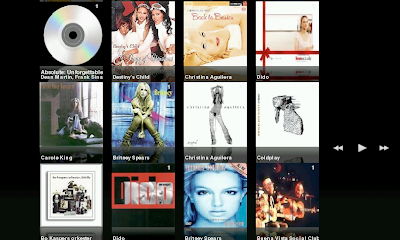
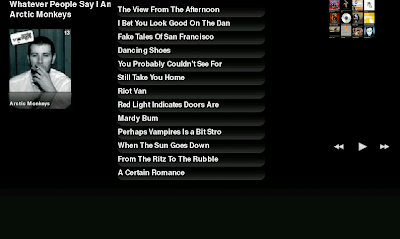
As you can see, the interface itself is pretty simple. I've emphasized visual aspecs, ease of use and touch screen navigation on the interface design.
On the album view, you can see a list of all albums on MMC1 and MMC2 on your device. You can use rocker up and down to scroll the list up and down. Also, you can use dragging the screen with your finger to scroll up and down. It's not quite something I'd call smooth scrolling, but I'm pretty sure I can get it to run about twice as fast as it's running now, which should provide an almost smooth scroll. Albums are sorted by artist and the album cover (or something related to the artist and cd) is retrieved from the net. Artist name is displayed in the dcs reflection (yeah, how cool is that reflection. Mind you, it's the cause of the long startup time - but well worth it!). SOng count is displayed in the top right corner of the cd.
Ok, click on any of the albums to see the songs in the album. Album name and artist is diplayed on the left along with the cd cover. There is a back-to-list button at the top rigt of the view. You can always use the fullscreen button to switch to the fullscreen mode (which is preferred mode). Click on any song to start playing. You can use rocker left to go to previous song and rocker right to go to next song. Rocker functions work in album list view as well. Middle button toggles pause/play.
Convinced that you want to try it out? Cool.
You need to have python installed on your device before you install!
For some reason the python 2.5 install seems to elude me. This link MAY work on N800: http://repository.maemo.org/extras/dists/bora/install/python2.5-runtime.install
For those who have trouble installing it, do this:
Open "Application Menu"->"Tools"->"Application Manager"
In the main menu choose "Tools"->"Application catalogue..."
Click in "New" button
Enter:
Web address: http://repository.maemo.org
Distribution: mistral
Components: free non-free
All right. Now, go to install list and select python-2.4.
Install.
Once you have Python, you just need the media player.
Latest version can be downloaded from here:
https://garage.maemo.org/frs/?group_id=234
And you are done.
Comments, bug reports and such are welcome in:
urho.konttori@gmail.com
as well as comments section of this blog.
UPDATE!
Latest version can be found here:
https://garage.maemo.org/frs/?group_id=234
Here, have a look at these two screenshots:


As you can see, the interface itself is pretty simple. I've emphasized visual aspecs, ease of use and touch screen navigation on the interface design.
On the album view, you can see a list of all albums on MMC1 and MMC2 on your device. You can use rocker up and down to scroll the list up and down. Also, you can use dragging the screen with your finger to scroll up and down. It's not quite something I'd call smooth scrolling, but I'm pretty sure I can get it to run about twice as fast as it's running now, which should provide an almost smooth scroll. Albums are sorted by artist and the album cover (or something related to the artist and cd) is retrieved from the net. Artist name is displayed in the dcs reflection (yeah, how cool is that reflection. Mind you, it's the cause of the long startup time - but well worth it!). SOng count is displayed in the top right corner of the cd.
Ok, click on any of the albums to see the songs in the album. Album name and artist is diplayed on the left along with the cd cover. There is a back-to-list button at the top rigt of the view. You can always use the fullscreen button to switch to the fullscreen mode (which is preferred mode). Click on any song to start playing. You can use rocker left to go to previous song and rocker right to go to next song. Rocker functions work in album list view as well. Middle button toggles pause/play.
Convinced that you want to try it out? Cool.
You need to have python installed on your device before you install!
For some reason the python 2.5 install seems to elude me. This link MAY work on N800: http://repository.maemo.org/extras/dists/bora/install/python2.5-runtime.install
For those who have trouble installing it, do this:
Open "Application Menu"->"Tools"->"Application Manager"
In the main menu choose "Tools"->"Application catalogue..."
Click in "New" button
Enter:
Web address: http://repository.maemo.org
Distribution: mistral
Components: free non-free
All right. Now, go to install list and select python-2.4.
Install.
Once you have Python, you just need the media player.
Latest version can be downloaded from here:
https://garage.maemo.org/frs/?group_id=234
And you are done.
Comments, bug reports and such are welcome in:
urho.konttori@gmail.com
as well as comments section of this blog.
UPDATE!
Latest version can be found here:
https://garage.maemo.org/frs/?group_id=234

Wednesday, February 07, 2007
Media Converter 1.3 released!
1.30 7.2.2007
About a month since the last update. Now that I have N800, I have been able to work a bit on making media converter to be a one stop program for N800 and 770 users for their video conversion needs.
Latest version contains separate resolutions for 770 and N800 users. There is a drop down at the top left where you choose your device and resolutions will be listed accordingly. Also, once you have tuned your favourite settings (such as output dir, device, resolution, bit rates), MC will remember in the future what settings you had. How cool is that?
There has been some problems with videos that do not tell mencoder how long they are. Thus mencoder doesn't report that to MC and grief will ensue, as the progress bar isn't moving. As a quick solution, I have added a seconds counter that reports how many seconds of the video has already been processed. It's a bit of a quick a dirty, but much better that the 0% progress bar.
And while not yet completely debugged, I have added a HD resolution of 400x480 to the N800 resolutions. It looks terrific, but the automatic cropping of video doesn't do a prefect job at the moment and the video is in 1/2 fps for the time being. I should work for 770 mplayer users as well.
Windows users should also be happy to hear that any previous users with problems opening the media converter (due to java installation problems) should now be able to open MC.
As always, thoughts, comments, recommendations are welcome to urho.konttori@gmail.com.
Downloads for windows, OSX and Linux here:
https://garage.maemo.org/frs/?group_id=26&release_id=409
Oh, new release of Theme Maker is just around the corner. I've put quite a bit of work to it and I just want to test it out really well before launching it. However, if you are interested in it, pop me an email and I can send out a beta now.
About a month since the last update. Now that I have N800, I have been able to work a bit on making media converter to be a one stop program for N800 and 770 users for their video conversion needs.
Latest version contains separate resolutions for 770 and N800 users. There is a drop down at the top left where you choose your device and resolutions will be listed accordingly. Also, once you have tuned your favourite settings (such as output dir, device, resolution, bit rates), MC will remember in the future what settings you had. How cool is that?
There has been some problems with videos that do not tell mencoder how long they are. Thus mencoder doesn't report that to MC and grief will ensue, as the progress bar isn't moving. As a quick solution, I have added a seconds counter that reports how many seconds of the video has already been processed. It's a bit of a quick a dirty, but much better that the 0% progress bar.
And while not yet completely debugged, I have added a HD resolution of 400x480 to the N800 resolutions. It looks terrific, but the automatic cropping of video doesn't do a prefect job at the moment and the video is in 1/2 fps for the time being. I should work for 770 mplayer users as well.
Windows users should also be happy to hear that any previous users with problems opening the media converter (due to java installation problems) should now be able to open MC.
As always, thoughts, comments, recommendations are welcome to urho.konttori@gmail.com.
Downloads for windows, OSX and Linux here:
https://garage.maemo.org/frs/?group_id=26&release_id=409
Oh, new release of Theme Maker is just around the corner. I've put quite a bit of work to it and I just want to test it out really well before launching it. However, if you are interested in it, pop me an email and I can send out a beta now.
Subscribe to:
Posts (Atom)