My computer stopped from booting last thursday. Not cool, I can tell you.
I think this is the second time when a motherboard has crashed on my computer. Last time it was when I was like 13 or 14 years old and had an amiga 2000. I had made a microphone controller on electronics class at school, which bas based on some diagrams by Mikro Bitti. It *should* have worked brilliantly. And it did, if it's purpose was to direct all charge from the battery though pretty much all the expensive chips in Amiga (Blitter, Copper, 68000, must have been some others as well).
Anyway, I was able to get a replacement in form of a laptop from the company that I'm doing freeleancing for. Much appreciated, Absolutions!
I've been too busy working to have had the time to setup programming enviroment on it for java development. Maybe I get the time today. I would really like to make a new version of theme maker.
You see, just on wednesday, I got an email from Johan Billen at Nokia. He reminded me that there is a way to remove the left, right and bottom borders that are surrounding apps in the normal view (not in full screen). I had the time to do a couple of tests and was able to remove all the totally unnecessary borders and got it working.
So, that's a small thing that I think would really improve theming.
Another thing that I was planning to test was that I noticed some chinese and japanese people hacking their way to install local fonts to their 770s to get proper localization for them. I just thought that it might make sense to allow theme to set the device main font and install the font at the same time.
It would thus allow a theme specifically for the chinese and another for the japanese. It would also benefit any themes that need to really get the look right (like LCARS theme. Why is no-one making a proper LCARS???)
I would go ahead and buy a mac mini to my desktop this minute if it wasn't that last time I did it, apple lauched a new model 2 weeks later for the same price and much better specs. I would rather skip that mistake this time around, especially as it's been something like 200 days since last update and there speculation in the air that apple will launch the new model any day now.
A good thing is that as I freelance, I get to deduct the vat from the computer price. I wonder if I can deduct the whole thing from profits, as really I cannot work without it, so it's an investment. I think I got to call the tax people for that. Anyway, dropping the VAT (22%) is a nice even if I couldn't drop anything else.
Oh, back to 770 issues. I tested mplayer on 770 again yesterday. Audio sync on mp3dsp seemed much better. I was able to get it completely offsync a few times, but otoh, it was perfectly on sync other times (even on same video). 400x240 video at full fps was perfect on 1x scaling and skipped frames on 2x (800x480 fullscreen) only when the action was really intense. I tend to test with two videos, one movie trailer and one slow action clip from a movie. Congrats Serge for making the mplayer work on 770. I hope you get the last bits right and 400x240 playback full fps is reality next time you release mplayer.
The best thing about mplayer that I can think of is that it will allow playback of google video and other web based clips. They are usually small enough that 770 will have the power to decode them, and being able to do that will benefit 770 tons.
Oh, forgot to talk about java. I noticed that jamvm was ported to 770. Way cool. The actual engine was tiny, classpath was huge. As I haven't had the time to test (I was working unti 23 yesterday), I haven't had the time to test jamvm either. With that huge a classpath, I would love that the installer would install that to the MMC.
Also, apparently the installer isn't complete yet, so maybe the author could make it application installer installable and consider the classpath to MMC option.
Anyway, I'm anxious to do some performance testing on java. Anyone done any benchmarking? What's the fastest way to do bitmap operations on jamvm?
Tuesday, August 29, 2006

Monday, August 21, 2006
Theme maker 0.85 versio is out
I just finished theme maker 0.85 last thursday. It's now been tested out by Tom Morris, author for the Aqua theme. From his feedback, I can say that it's all out for the grabs for anyone wishing to make a theme for Nokia 770. You can get Toms aqua theme from his homepage.
The latest version is special in the sense that the uninstaller works now flawlessly and removes all the icons and graphics the installer created. The most important feature on it though is that the scrollbars in opera are now themed close to perfection and they appear just the same way as they are in the other applications.
You can download theme maker from here: ThemeMaker085.zip
And here to demonstrate the scrollbars: Brushed theme (12 px fonts)
Screenshot is from brushed theme.
The latest version is special in the sense that the uninstaller works now flawlessly and removes all the icons and graphics the installer created. The most important feature on it though is that the scrollbars in opera are now themed close to perfection and they appear just the same way as they are in the other applications.
You can download theme maker from here: ThemeMaker085.zip
And here to demonstrate the scrollbars: Brushed theme (12 px fonts)
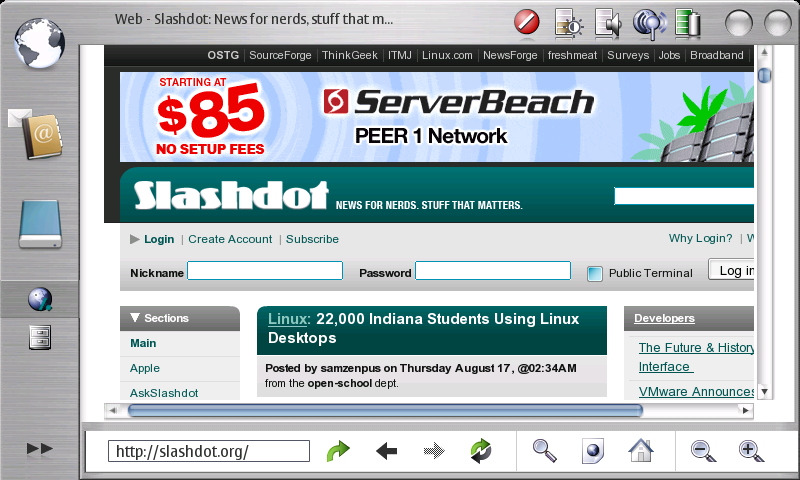
Screenshot is from brushed theme.
Monday, August 07, 2006
About 770 pdf reader
I was just yesterday reading The Tux magazine on my 770 on the couch. They use a wide screen format with two to three columns. Lots of images, a brilliant magazine indeed. Works really fast on the it 2006 too. While I was reading it though, I had problems reading it comfortably. If I used the fit to width -option, which I love, the font was too small to be read at a relaxed distance. Fortunately 770 has excellent zoom options. I zoomed in once or two times, depending on the page and reading was a bliss. ... Until I had to change page. In fit to width mode, you can just press arrow right to go to the next page. Unfortunately that means that I have to zoom out two times to fit width mode, press next page button and then zoom in two times before I can read the next page. That's 5 presses to get to the next page. Unfortunately that's often not even enough. The right button press registers much too easily two presses when I press it just once, after which I have to try to go back one page with the left button. Left button naturally behaves just like the right one. The same applies to the image viewer.

Well, to get things more comfortable, I noticed that I can switch to normal mode from the fullscreen mode and use the icons at the bottom of the page to go to the next page and then I'd switch back to fullscreen mode. Only 2 button presses and one screen tap to go to the next page. Quite an improvement, but still, there is no reason why it needs to take more than one press.
 Zoom level 2
 Zoom level 3
Enter navigation middle button. At the moment it is used to switch to fullscreen and back. But what's the need when 770 has a dedicated button to just to do that. So, it figures that a change is needed. How about using the navigation middle button to go to the next page (or show the next image in image viewer)? It would be a simple solution and the current button behaviour would not be missed.

Well, to get things more comfortable, I noticed that I can switch to normal mode from the fullscreen mode and use the icons at the bottom of the page to go to the next page and then I'd switch back to fullscreen mode. Only 2 button presses and one screen tap to go to the next page. Quite an improvement, but still, there is no reason why it needs to take more than one press.
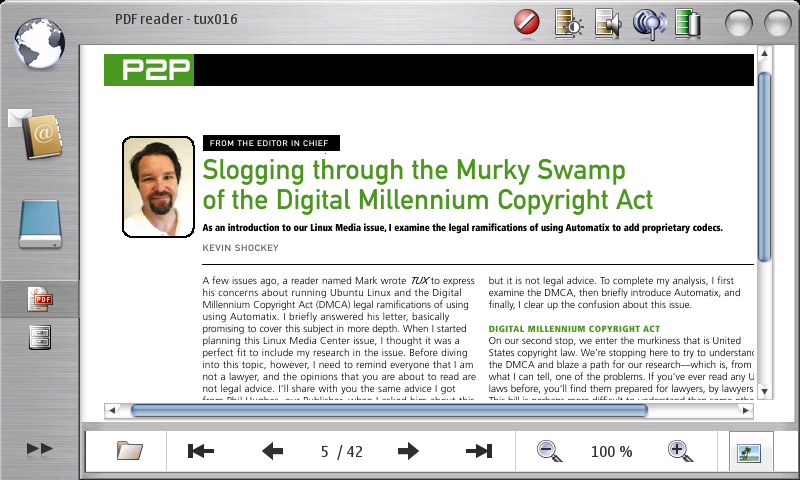 Zoom level 2
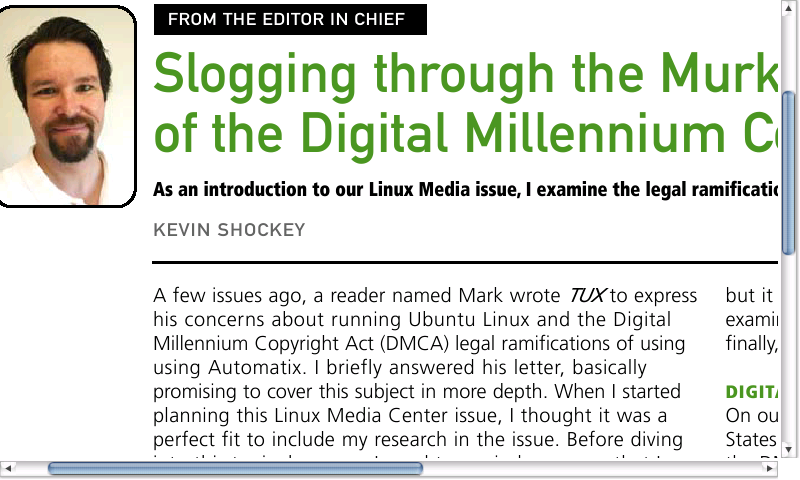 Zoom level 3
Enter navigation middle button. At the moment it is used to switch to fullscreen and back. But what's the need when 770 has a dedicated button to just to do that. So, it figures that a change is needed. How about using the navigation middle button to go to the next page (or show the next image in image viewer)? It would be a simple solution and the current button behaviour would not be missed.
Monday, June 19, 2006
Activites
Phew! After having dental surgery last monday, I'm finally beginning to look like a human again. Almost feel like one as well.
While suffering from horrible aches, I've been busy implementing some changes to media converter and theme maker. One of the biggest things is that I've been able to create projects for them in maemo garage. All files are now in svn excluding two jar files for theme maker for which I had some surprising problems in uploading them using netbeans 5.5. Oh well, I may just end up putting them in the svn some other way. Those libraries are not mine anyway, so I'm not sure if they belong in svn anyway. Before anyone comes asking, they were for a free (as in do whatever you want with them) license.
I just updated my 770 to 2006 os beta a few days after release. Splendid stuff. Many many improvements. Especially I like the integration on virtual memory, which is completely smooth. Also, EABI kicks as overall, as pdfs, flash and pretty much everything is much faster. Splendid stuff, as I said.
So, off I went to improve theme maker for the 2006 OS. A few tests and I got the installer stuff working. Then some heavy work on trying to figure out hot the theme actually works and now I can say that theme maker is inches off being complete. It's definately complete enough to make themes in already. What I'm especially proud is that theme maker is able to make .deb installer package for the theme now. What's so cool about it is that I was able to make the debian in java code and thus you don't need linux tools to be able to make packages.
Also, NuvoTheme is now in splendid shape, and it's naturally included in theme maker. You can download NuvoTheme from here (uninstall previous version first if you have such) and theme maker from here.
Also, I've been busy looking at media converter. Still working on multiple platforms really well. All the code is handled in subverion and I also tested tasking myself through garage. Wroks really well. Kudos for nokia for setting up garage! The latest media converter hasn't been changed much. Some small cosmetical issues, such as tuning presets and adding a notification that you can also dragndrop files to media converter. But inside there is one small and really nice improvement. For some reason it 2006 was not able to open videos that were made on mencoder and didn't have explicit -ofps parameter to set frame speed. Now, in the new version, this parameter is set on always and thus you can play back videos on ti 2006 as well.
I tested 352x288 resolution in it 2005 previously, but the video was a bit too choppy for my taste. In it 2006 this has changed completely. 352x288 resolution is the resolution proper for 770. It's smooth and looks absolutely gorgeous. Have a look at this small clip I made to experience what I'm talking about : ff7clip.
While suffering from horrible aches, I've been busy implementing some changes to media converter and theme maker. One of the biggest things is that I've been able to create projects for them in maemo garage. All files are now in svn excluding two jar files for theme maker for which I had some surprising problems in uploading them using netbeans 5.5. Oh well, I may just end up putting them in the svn some other way. Those libraries are not mine anyway, so I'm not sure if they belong in svn anyway. Before anyone comes asking, they were for a free (as in do whatever you want with them) license.
I just updated my 770 to 2006 os beta a few days after release. Splendid stuff. Many many improvements. Especially I like the integration on virtual memory, which is completely smooth. Also, EABI kicks as overall, as pdfs, flash and pretty much everything is much faster. Splendid stuff, as I said.
So, off I went to improve theme maker for the 2006 OS. A few tests and I got the installer stuff working. Then some heavy work on trying to figure out hot the theme actually works and now I can say that theme maker is inches off being complete. It's definately complete enough to make themes in already. What I'm especially proud is that theme maker is able to make .deb installer package for the theme now. What's so cool about it is that I was able to make the debian in java code and thus you don't need linux tools to be able to make packages.
Also, NuvoTheme is now in splendid shape, and it's naturally included in theme maker. You can download NuvoTheme from here (uninstall previous version first if you have such) and theme maker from here.
Also, I've been busy looking at media converter. Still working on multiple platforms really well. All the code is handled in subverion and I also tested tasking myself through garage. Wroks really well. Kudos for nokia for setting up garage! The latest media converter hasn't been changed much. Some small cosmetical issues, such as tuning presets and adding a notification that you can also dragndrop files to media converter. But inside there is one small and really nice improvement. For some reason it 2006 was not able to open videos that were made on mencoder and didn't have explicit -ofps parameter to set frame speed. Now, in the new version, this parameter is set on always and thus you can play back videos on ti 2006 as well.
I tested 352x288 resolution in it 2005 previously, but the video was a bit too choppy for my taste. In it 2006 this has changed completely. 352x288 resolution is the resolution proper for 770. It's smooth and looks absolutely gorgeous. Have a look at this small clip I made to experience what I'm talking about : ff7clip.
Monday, May 29, 2006
Theme Maker 0.5
I've been not too keen on doing updates to the theme maker in the absence of 2006 edition. However, tigert got me convinced about a week ago to add the installer components to the theme maker now. This way I can concentrate to just to add the changes that need to be done for the theme to work.
I managed to do the installer completely in java (nice), so that theme maker is still completely cross platoform and especially, also works in windows.
I also decided that since launch of 2006 edition is in Juna and that is a span of 30 days,
I figured that it might also mean the end of june, although I highly doubt it.
So, I decided to make another release now.
This version has been done to support 2006 edition and builds a debian package that works on 2006. So, if you are a Nokia developer, you can build themes that install nicely with the app installer, but for the rest of us, installer is not so easy. Fortunately, the debian does work in 2005 edition quite well. By following the steps described below, you should have no trouble installing themes on your 2005 edition as long as you have root access. Notice that 2006 edition will not require root access anymore.
Once you make a theme with the 0.5 version, you will get a themename.deb file in your installation folder.
Copy that to your 770.
open xterm.
sudo gainroot
cd /media/mmc1
dpkg -x themename.deb /
This will install the theme to your 770. Next, just go and change you theme to the new one.
Nice thing about the deb is that it is relatively compact size.
I'm off to New York tomorrow for a week or so and will be back on the 8th of June, so don't be surprised if I'm not returning emails for a while.
Oh, theme maker link: ThemeMaker.zip
And test theme debian: NuvoTheme.deb
I managed to do the installer completely in java (nice), so that theme maker is still completely cross platoform and especially, also works in windows.
I also decided that since launch of 2006 edition is in Juna and that is a span of 30 days,
I figured that it might also mean the end of june, although I highly doubt it.
So, I decided to make another release now.
This version has been done to support 2006 edition and builds a debian package that works on 2006. So, if you are a Nokia developer, you can build themes that install nicely with the app installer, but for the rest of us, installer is not so easy. Fortunately, the debian does work in 2005 edition quite well. By following the steps described below, you should have no trouble installing themes on your 2005 edition as long as you have root access. Notice that 2006 edition will not require root access anymore.
Once you make a theme with the 0.5 version, you will get a themename.deb file in your installation folder.
Copy that to your 770.
open xterm.
sudo gainroot
cd /media/mmc1
dpkg -x themename.deb /
This will install the theme to your 770. Next, just go and change you theme to the new one.
Nice thing about the deb is that it is relatively compact size.
I'm off to New York tomorrow for a week or so and will be back on the 8th of June, so don't be surprised if I'm not returning emails for a while.
Oh, theme maker link: ThemeMaker.zip
And test theme debian: NuvoTheme.deb
Subscribe to:
Posts (Atom)