Adobe is just insane.
I'm again having some time and space in my mind to look at the world around me. A huge work related milestone was reached today. Something ended and something starts. It's a really big shame that the things that do succeed in my new position are definitely something I would not be able to share for a long long time with anybody outside of Nokia.
I wrote some time ago about how insane the flash 11 is for 3D support with a very concise representation compared to that of html5 and silverlight. Now, adobe really has done it. Adobe alchemy allows conversion of c/c++ code into low level actionscript bytecode. Secure execution at native speed. Full GDB support, compiles with gcc, supports all the tricks c++ has in its sleeve. Just insane. The bytecode is now running at 40% native, wiht high hopes to get it to 80% native speed before alchemy is launched. You also get finally direct access to converted c++ libraries from AS code. All existing code assets are finally browser compatible.
If you are interested in where online gaming is heading in the future, look no further.
As a demonstration, Epic has converted the >1MLoc unreal engine with alchemy. Watch this whether you are or are not not a coder.
If you are a coder, you need to reserve 45 minutes and watch the video. I am serious. You *have* to watch it.
This is bliss. Triple-a -level games coming to facebook ;). Then push button conversion to adobe air application for your favorite i or android device. I wonder how this will work for windows phone in the future.
Showing posts with label Nokia. Show all posts
Showing posts with label Nokia. Show all posts
Thursday, March 08, 2012

Monday, February 25, 2008
Theme Maker
I completely forgot to talk about theme maker in my last post. Yes, I finally gave into the dark side. I moved to use Nokia official template for theme maker. This is good and bad. Bad in that if you had made something on the old theme maker, you'll have to port it to the new template. Good in the sense that you'll get all the features in exactly the manner god of this device intended (nokia).

Above, you can see the first test theme that I made with the new theme maker. It's there to also test out how 'light' themes look. As you've noticed, pretty much all the current themes are very dark. So, to balance the 'turn to the dark side', here is the latest (1.2) iteration of the nuvo theme.
So, many people probably don't know what theme maker is. It's an java application for windows/osx/linux that makes a theme out of an png file. So, you open the png in gimp or photoshop, edit it out, open theme maker, specify the theme name, font size and click on make theme. Wait a minute or so and you have a .deb file of your newly created theme. Current version doesn't set the bg, but you can't have it all on day one.
If you are interested in Nuvo, dl it from here:
NuvoPearl 1.2
and for theme maker:
https://garage.maemo.org/frs/download.php/3418/ThemeMaker1.1.2.zip
When you have new themes, please put them to the maemo.org/downloads for all the world to use!
Just to show the nuvopearl a bit more, here's a screenshot of file manager. Smaller font makes it much nicer looking as well. (and usable)


Above, you can see the first test theme that I made with the new theme maker. It's there to also test out how 'light' themes look. As you've noticed, pretty much all the current themes are very dark. So, to balance the 'turn to the dark side', here is the latest (1.2) iteration of the nuvo theme.
So, many people probably don't know what theme maker is. It's an java application for windows/osx/linux that makes a theme out of an png file. So, you open the png in gimp or photoshop, edit it out, open theme maker, specify the theme name, font size and click on make theme. Wait a minute or so and you have a .deb file of your newly created theme. Current version doesn't set the bg, but you can't have it all on day one.
If you are interested in Nuvo, dl it from here:
NuvoPearl 1.2
and for theme maker:
https://garage.maemo.org/frs/download.php/3418/ThemeMaker1.1.2.zip
When you have new themes, please put them to the maemo.org/downloads for all the world to use!
Just to show the nuvopearl a bit more, here's a screenshot of file manager. Smaller font makes it much nicer looking as well. (and usable)

Thursday, January 31, 2008
USB OTG the easy way
Some people have been writing about the USB OTG use with need to hack the cable by soldering a few wires together. Even Ars technica went the hard way of soldering a cable. This is not the way to do it my friends. On a computer-like device, the way is to 'solder software', not hardware. I found the instructions on software solution from muru and then thought:"This is still just too hard". So, what to do? Make it easy, of course.
Enter USBControl

I thought that this is worth a full hour of my time. So, today I put together a new application that you can use to switch the device (N800 or N810) between USB Host and USB OTG modes. All you need, is an USB Female-Female adaptor like this:
http://www.amazon.com/USB-Type-Female-Coupler-Adapter/dp/B000I97N0S
So, remember, that is USB A female to female adaptor. Costs pennies. Well, almost.
After you have the USB adaptor, just install ukmp from here: Garage
That version is beta. You may need to install ukmp first from here: maemo.org
ukmp is my media player, but it now comes bundled with uktube (youtube downloader) and USBControl.
Finally, open USBController from your extras menu. Click on HOST. Attach USB cable and e.g keyboard to the other end and.... There you go. Nothing else needed. Open notes, xterm, whatnot and start typing. Or, remove the kb and attach a memory stick. For me, even wireless keyboards work just fine without any powered hub. Same for one memory stick, but another memory stick needed more juice than the device had.
If your peripheral needs more juice, just put a powered hub in between. Simple, huh?
Enter USBControl

I thought that this is worth a full hour of my time. So, today I put together a new application that you can use to switch the device (N800 or N810) between USB Host and USB OTG modes. All you need, is an USB Female-Female adaptor like this:
http://www.amazon.com/USB-Type-Female-Coupler-Adapter/dp/B000I97N0S
So, remember, that is USB A female to female adaptor. Costs pennies. Well, almost.
After you have the USB adaptor, just install ukmp from here: Garage
That version is beta. You may need to install ukmp first from here: maemo.org
ukmp is my media player, but it now comes bundled with uktube (youtube downloader) and USBControl.
Finally, open USBController from your extras menu. Click on HOST. Attach USB cable and e.g keyboard to the other end and.... There you go. Nothing else needed. Open notes, xterm, whatnot and start typing. Or, remove the kb and attach a memory stick. For me, even wireless keyboards work just fine without any powered hub. Same for one memory stick, but another memory stick needed more juice than the device had.
If your peripheral needs more juice, just put a powered hub in between. Simple, huh?
Monday, November 19, 2007
UKMP for N810 and N800 now in the repositories
I was up quite long on friday. Yeah, I know what you must be thinking: partying. Nope, I wish. I was duking it out with ukmp and maemo extras. I finally gave the decisive blow at around 4 AM. I got the ukmp uploaded to the extras repositories for bora and chinook!

I decided on friday that I won't rest until it's there. With hindsight it was a bad decision, as I was pretty wasted the whole saturday. Did manage to go partying then though. However, I'm very pleased that the update support structure is there now and that the new n810 owners will also be able to ge the new UKMP.
So, what is new with the 1.70 release compared to 1.6 series? Layout has been changed a bit, covers are bigger, reflection is done on the fly. Things just look a bit better. Also, the kinetic scrolling has been tweaked quite a lot and the progress bar (although a bit buggy) allows you to skip to correct place. I actually also had really wicked ligting effect at the place where your finger touches the screen for a while. As it was mainly eye candy, I dropped it for a while. It may be making a come-back soon, as it was really neat looking effect. I just want to add a bit more 'fun' to it.
Next up will be a few minor update releases that address the bugs and startup speed issues. And now that ukmp is in the extras repository, updating will be an easy operation for you - the users.
For developers interested in helping out, I've been switching to 'proper' practices and the svn is now up-to date all the time.
So, os2007 users can find ukmp from:
http://maemo.org/downloads/product/OS2007/ukmp/
and os2008 users can find it from:
http://maemo.org/downloads/product/OS2008/ukmp/
Simple, eh ;)

I decided on friday that I won't rest until it's there. With hindsight it was a bad decision, as I was pretty wasted the whole saturday. Did manage to go partying then though. However, I'm very pleased that the update support structure is there now and that the new n810 owners will also be able to ge the new UKMP.
So, what is new with the 1.70 release compared to 1.6 series? Layout has been changed a bit, covers are bigger, reflection is done on the fly. Things just look a bit better. Also, the kinetic scrolling has been tweaked quite a lot and the progress bar (although a bit buggy) allows you to skip to correct place. I actually also had really wicked ligting effect at the place where your finger touches the screen for a while. As it was mainly eye candy, I dropped it for a while. It may be making a come-back soon, as it was really neat looking effect. I just want to add a bit more 'fun' to it.
Next up will be a few minor update releases that address the bugs and startup speed issues. And now that ukmp is in the extras repository, updating will be an easy operation for you - the users.
For developers interested in helping out, I've been switching to 'proper' practices and the svn is now up-to date all the time.
So, os2007 users can find ukmp from:
http://maemo.org/downloads/product/OS2007/ukmp/
and os2008 users can find it from:
http://maemo.org/downloads/product/OS2008/ukmp/
Simple, eh ;)
Friday, September 07, 2007
Urho Konttori has Started working for Nokia (update - UKMP concept image included!)
Probably some of the people have been wondering how come I've been laying so low for the past two weeks. This is due to the fact that I began working at Nokia on monday. I've very excited about it and people at Nokia have been really great. I am sure I can contribute even more to the device now that I'm part of the process as an insider.
Will I stop developing for the community? Nope.
Out of context, I just read GeekPenguins blog about the media centers for the internet tablets.
It's a quick comparison of Canola, Kagu and UKMP.
http://geekpenguin.blogspot.com/2007/09/onboard-media-your-way.html
EDIT:
Quick photo of UKMP 1.7 concept here as well to show on the planet maemo page:

I'll try to do some development this weekend on ukmp. At least I'll try to fix some bugs and if possible there will be bigger changes as well. I have such a great plan on how the interface should behave. The basic idea is this:
In the cover list view, I'll move to a bit more cover flow (iphone) like mode of scrolling from left to right. Covers themselves will be bigger (160x160). Covers will be in two rows. 160X5=800, so you will be able to see 10 albums on screen at a time. This is less than the current of 12, but I think it's worth the hassle.
I'll move the progress bar to be displayed on the top part of the screen all the time, along with easily pressable buttons for previous, next, play, pause. Also, this will mean that the 'currently playing' view won't probably be needed anymore in the future.
As you can see from the list of changes that they are not minor. It will take me probably 12-20 hours to do. What this means in calendar time will depend on how much I want to finish GTA San Andreas. ;)
Anyway, I'll now start making the sketches and bug fixes. There will be a bug fix release hopefully today. If it happens, I'll blog about it.
EDIT:
Took just a bit over an hour to make the 'proof of concept' image of the new cover interface. You know, I really love to work towards something specific. A plan has to be in place before any coding should start. And everyone (in this case: me) has to have a common view on what to aim for. In most of the cases, an image tells the best story. Worth more than thousand words? Definately!
Anyway, this is a concept sketch and once I add the party mode toggles and whatnot, it'll change a bit, but this is what I'm aiming for. If you have comments on the positioning and stuff, please let me know asap!
Oh, and I'll add the artist names in pretty much the same manner as in the previous versions. The lower row will have the name in the reflection and the row above will have the artist name above the cover. This should be good way to not to confuse the user.
EDIT: Alternative interface where buttons are positioned at the bottom. Also, note that the scrolling will be from left to right, not from top to bottom.

Edit 3:
Added exit button, lamp for keep screen lit - mode and repositioned things a bit. It's becoming a bit cluttered already. I'll have to think about the icon positioning a bit more. Anyway, I'll next move to implementing the new cover artwork behavior and then proceed to sideway scrolling and finally focus again on the buttons. Anyway, until then, keep comments coming. It'll probably be the latter part of next week until I have anything solid to test. Could be even longer.

Will I stop developing for the community? Nope.
Out of context, I just read GeekPenguins blog about the media centers for the internet tablets.
It's a quick comparison of Canola, Kagu and UKMP.
http://geekpenguin.blogspot.com/2007/09/onboard-media-your-way.html
EDIT:
Quick photo of UKMP 1.7 concept here as well to show on the planet maemo page:

I'll try to do some development this weekend on ukmp. At least I'll try to fix some bugs and if possible there will be bigger changes as well. I have such a great plan on how the interface should behave. The basic idea is this:
In the cover list view, I'll move to a bit more cover flow (iphone) like mode of scrolling from left to right. Covers themselves will be bigger (160x160). Covers will be in two rows. 160X5=800, so you will be able to see 10 albums on screen at a time. This is less than the current of 12, but I think it's worth the hassle.
I'll move the progress bar to be displayed on the top part of the screen all the time, along with easily pressable buttons for previous, next, play, pause. Also, this will mean that the 'currently playing' view won't probably be needed anymore in the future.
As you can see from the list of changes that they are not minor. It will take me probably 12-20 hours to do. What this means in calendar time will depend on how much I want to finish GTA San Andreas. ;)
Anyway, I'll now start making the sketches and bug fixes. There will be a bug fix release hopefully today. If it happens, I'll blog about it.
EDIT:
Took just a bit over an hour to make the 'proof of concept' image of the new cover interface. You know, I really love to work towards something specific. A plan has to be in place before any coding should start. And everyone (in this case: me) has to have a common view on what to aim for. In most of the cases, an image tells the best story. Worth more than thousand words? Definately!
Anyway, this is a concept sketch and once I add the party mode toggles and whatnot, it'll change a bit, but this is what I'm aiming for. If you have comments on the positioning and stuff, please let me know asap!
Oh, and I'll add the artist names in pretty much the same manner as in the previous versions. The lower row will have the name in the reflection and the row above will have the artist name above the cover. This should be good way to not to confuse the user.
EDIT: Alternative interface where buttons are positioned at the bottom. Also, note that the scrolling will be from left to right, not from top to bottom.

Edit 3:
Added exit button, lamp for keep screen lit - mode and repositioned things a bit. It's becoming a bit cluttered already. I'll have to think about the icon positioning a bit more. Anyway, I'll next move to implementing the new cover artwork behavior and then proceed to sideway scrolling and finally focus again on the buttons. Anyway, until then, keep comments coming. It'll probably be the latter part of next week until I have anything solid to test. Could be even longer.

Sunday, August 26, 2007
uktube bugfix version released
Thanks to guys at internettablettalk, I noticed that youtube had changed the way video files are referred on the page source code. Thus, uktube stopped working until this problem had been fixed. I was just able to fix and test it a few minutes ago and I wanted to let you all know that the problem has been fixed and there is a new version for you to download.
So, once again, thanks for letting me know of the uktube bug. UKMP 1.62 only fixes uktube bug in downloading youtube videos. So, don't expect any fixes related to ogg files.
It seems that ogg installation at the moment is missing ogg demux for some users. I'll try to get oggs working again in ukmp for the 1.63 release some time next week
EDIT: LINK FIXED
Download here:
http://maemo.org/downloads/product/ukmp/
So, once again, thanks for letting me know of the uktube bug. UKMP 1.62 only fixes uktube bug in downloading youtube videos. So, don't expect any fixes related to ogg files.
It seems that ogg installation at the moment is missing ogg demux for some users. I'll try to get oggs working again in ukmp for the 1.63 release some time next week
EDIT: LINK FIXED
Download here:
http://maemo.org/downloads/product/ukmp/
Friday, August 03, 2007
UKMP 1.51 combined with updated UKTUBE
UKMP 1.50 release was a bit hasty one and I missed a few real annoyances. Well, 1.51 version is a bug fix version and should fix the most critical bugs.
1. Clicking in the album works ACTUALLY selects the album you clicked on and not the one above or below it. (Yeah, how did I miss that? I have no idea)
2. If you have less that 16 albums, song list allows you to scroll (It actually didn't allow you to scroll in 1.50)
3. 1.51 consumes almost 0 processor time when idling. Previous version only went to energy saving when it was doing something and went to full 100% power use when it was idle. Just a small mistake of using == instead of != in one place... An example of why not code after midnight.
4. Because of the number three, smooth scrolling is smoother, as it's not in processor saving mode when it's scrolling ;)
5. Press and hold back button to close the app works.
All right. So, it's in a usable state now. I've been using 1.51 for a few days now for listening hours and hours of music and it seems stable and a joy to use. Next version will have exit button and optimized startup time.
UKTUBE has also been updated to support logging into youtube account as well as it tells you if a download fails instead of crashing. Most of the time if a download fails, it's because there is a age check in youtube. Just insert your login credentials to uktube to le uktube to login and tell youtube that your are not underaged.
Next uktube version will store the credentials and I will probably clean up the interface a bit.
You can download the latest version of UKMP and UKTUBE from here:
http://maemo.org/downloads/product/ukmp
and remember that you need to have python and mplayer installed. If you don't have them, install them first from here:
Python
mplayer
1. Clicking in the album works ACTUALLY selects the album you clicked on and not the one above or below it. (Yeah, how did I miss that? I have no idea)
2. If you have less that 16 albums, song list allows you to scroll (It actually didn't allow you to scroll in 1.50)
3. 1.51 consumes almost 0 processor time when idling. Previous version only went to energy saving when it was doing something and went to full 100% power use when it was idle. Just a small mistake of using == instead of != in one place... An example of why not code after midnight.
4. Because of the number three, smooth scrolling is smoother, as it's not in processor saving mode when it's scrolling ;)
5. Press and hold back button to close the app works.
All right. So, it's in a usable state now. I've been using 1.51 for a few days now for listening hours and hours of music and it seems stable and a joy to use. Next version will have exit button and optimized startup time.
UKTUBE has also been updated to support logging into youtube account as well as it tells you if a download fails instead of crashing. Most of the time if a download fails, it's because there is a age check in youtube. Just insert your login credentials to uktube to le uktube to login and tell youtube that your are not underaged.
Next uktube version will store the credentials and I will probably clean up the interface a bit.
You can download the latest version of UKMP and UKTUBE from here:
http://maemo.org/downloads/product/ukmp
and remember that you need to have python and mplayer installed. If you don't have them, install them first from here:
Python
mplayer
Tuesday, July 24, 2007
UKMP 1.5 is out and it's looking sweet
Big thanks to Roope Rainisto from Nokia for helping out tune up the interface. The song list now sports thumb interface for selecting songs. Looks better too, have a look at it yourselves:

Another big thing that's been asked for is kinetic scrolling. After trying it out for a while, I am very impressed by it. Yeah, I know, here is another developer again boasting his ego, but I am not applauding myself for that. Kinetic scrolling is really sall thing to add technically once you have smooth scrolling anyway. But the thing I've been thinking about now is that Nokia should implement that same thing to the web browser. It would be so much better to use that to scroll around the page. Let's say you've read the article through. Wan't to go up to the beginning of the page? No probs, just flick the finger quickly and it will scroll to the top in a split sec. Want to scroll in a controllable fashion, scroll with your finger and stop it before raising it from the device surface.
One more thing I have forgotten to write about is that this version also supports wma files and might also support aac files as well as some bug fixes related to continuous playback.
You can download the latest version of UKMP and UKTUBE from here:
http://maemo.org/downloads/product/ukmp
and remember that you need to have python and mplayer installed. If you don't have them, install them first from here:
Python
mplayer
As always, you can check out the new features from the video below:

Another big thing that's been asked for is kinetic scrolling. After trying it out for a while, I am very impressed by it. Yeah, I know, here is another developer again boasting his ego, but I am not applauding myself for that. Kinetic scrolling is really sall thing to add technically once you have smooth scrolling anyway. But the thing I've been thinking about now is that Nokia should implement that same thing to the web browser. It would be so much better to use that to scroll around the page. Let's say you've read the article through. Wan't to go up to the beginning of the page? No probs, just flick the finger quickly and it will scroll to the top in a split sec. Want to scroll in a controllable fashion, scroll with your finger and stop it before raising it from the device surface.
One more thing I have forgotten to write about is that this version also supports wma files and might also support aac files as well as some bug fixes related to continuous playback.
You can download the latest version of UKMP and UKTUBE from here:
http://maemo.org/downloads/product/ukmp
and remember that you need to have python and mplayer installed. If you don't have them, install them first from here:
Python
mplayer
As always, you can check out the new features from the video below:
Thursday, July 05, 2007
UKTUBE 0.6 out, UKMP 1.4 out (in beta)
UKTUBE 0.6
Uktube 0.6 adds support for streaming of videos. You no longer have to wait for the video to finish downloading, as UKTUBE will just buffer the first one megabyte and then start playing.
I also added delete, which deletes the file, takes it out of the dropdown and selects the next video.
UKMP 1.4
UKMP 1.4 has major feature of supporting video. Now, basically that means that it also needs mplayer. As UKMP and UKTUBE are bundled together you would need mplayer for uktube anyway, so I don't see that as too much of a problem. What makes this really beta quality is that ukmp cannot make thumbnails of the videos by itself. It relies on UKTUBE to make thumbnails for the videos it downloads. If Serge (ssvb) can compile mplayer with support for -vo jpeg, I can add the thumbnails automatically on start.
Have a look at the video to see how watching videos works on UKMP at the moment.
About the release:
I managed to squeeze out the major bugs from UKMP 1.4 and UKTUBE 0.6. I'm about to leave for a week long vacation, so I felt that even though I would have wanted to give both of the apps some more polish, I just didn't have the time to do it. In any case, I'm relatively happy on how the new features turned out.
1.5 of UKMP will focus on improving the UI to look better. Thanks Roope Rainisto for a very good suggestion on the songlist part. I will implement that to the 1.5 version.
You can download the latest version of UKMP and UKTUBE from here:
http://maemo.org/downloads/product/ukmp
and remember that you need to have python and mplayer installed. If you don't have them, install them first from here:
Python
mplayer
Uktube 0.6 adds support for streaming of videos. You no longer have to wait for the video to finish downloading, as UKTUBE will just buffer the first one megabyte and then start playing.
I also added delete, which deletes the file, takes it out of the dropdown and selects the next video.
UKMP 1.4
UKMP 1.4 has major feature of supporting video. Now, basically that means that it also needs mplayer. As UKMP and UKTUBE are bundled together you would need mplayer for uktube anyway, so I don't see that as too much of a problem. What makes this really beta quality is that ukmp cannot make thumbnails of the videos by itself. It relies on UKTUBE to make thumbnails for the videos it downloads. If Serge (ssvb) can compile mplayer with support for -vo jpeg, I can add the thumbnails automatically on start.
Have a look at the video to see how watching videos works on UKMP at the moment.
About the release:
I managed to squeeze out the major bugs from UKMP 1.4 and UKTUBE 0.6. I'm about to leave for a week long vacation, so I felt that even though I would have wanted to give both of the apps some more polish, I just didn't have the time to do it. In any case, I'm relatively happy on how the new features turned out.
1.5 of UKMP will focus on improving the UI to look better. Thanks Roope Rainisto for a very good suggestion on the songlist part. I will implement that to the 1.5 version.
You can download the latest version of UKMP and UKTUBE from here:
http://maemo.org/downloads/product/ukmp
and remember that you need to have python and mplayer installed. If you don't have them, install them first from here:
Python
mplayer
Thursday, June 28, 2007
UKTUBE 0.5 out
UKTUBE 0.5 is a nice small step for internet tablet users. Have a look at it:
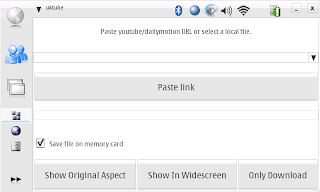
Ok, since 0.3, there have been many great features.
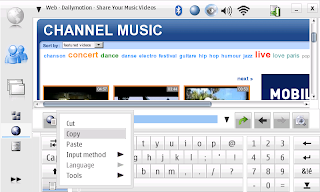
So, there are two ways to copy the URL from youtube and dailymotion. The traditional is to navigate to the page where the video is located and click on the address bar and then select copy, like in the image below.
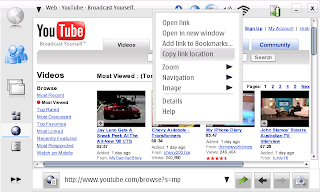
The second option is to hold your finger / pen over the link to the movie and keep it pressed for two seconds or so. Then a menu appear from which you can select copy link location, like in the image below.
Then you just open UKTUBE and click on the paste button.
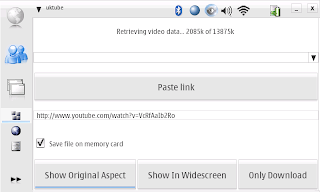 URL address will appear in the text field and by clicking either of the show buttons, the video will be downloaded and displayed immediately after download is complete. If you press only download, it won't play the video.
UKTUBE works in 770 and N800.
Download UKTUBE 0.5 from here:
https://garage.maemo.org/frs/download.php/1677/UKMP-1.3-uktube0.5.deb
and remember that you need to have python and mplayer installed. If you don't have them, install them first from here:
Python
mplayer

Ok, since 0.3, there have been many great features.
- Supports dailymotion videos
- Allows you to play downloaded videos (there is a dropdown for those)
- It's much faster in downloading
- Paste link (now, that's hot) - you copy the URL in browser and then just press that button.
- Allows you to also just download (if you don't need to watch it immediately)
- Videos are automatically added to the list
- If you download a video, after you've downloaded it or watched it, just press show in widescreen / normal to replay it. No need to select the same movie from dropdown.
So, there are two ways to copy the URL from youtube and dailymotion. The traditional is to navigate to the page where the video is located and click on the address bar and then select copy, like in the image below.

The second option is to hold your finger / pen over the link to the movie and keep it pressed for two seconds or so. Then a menu appear from which you can select copy link location, like in the image below.

Then you just open UKTUBE and click on the paste button.
 URL address will appear in the text field and by clicking either of the show buttons, the video will be downloaded and displayed immediately after download is complete. If you press only download, it won't play the video.
UKTUBE works in 770 and N800.
Download UKTUBE 0.5 from here:
https://garage.maemo.org/frs/download.php/1677/UKMP-1.3-uktube0.5.deb
and remember that you need to have python and mplayer installed. If you don't have them, install them first from here:
Python
mplayer
Subscribe to:
Posts (Atom)